AI for Content Creation: A Full Workflow, Not a Chat Box
Key takeaways
- Treat AI content as a workflow across finding ideas, drafting, SEO, visuals, and repurposing, not a single draft button.
- Feed the AI real context first: your voice as sample pages, your goals, your exact reader, and sourceable proof.
- Connect your Google Search Console so the tool targets pages at positions 11 to 20 that you can realistically win.
- Keep publishing, facts, strategy, and structural SEO changes in your hands, and set tools to review-first mode.
- Choose a single writing assistant if drafting speed is your only gap. Choose a connected system if the research and publishing chores are the bottleneck.
AI for content creation means using AI across the whole workflow, from idea and outline to drafting, SEO, visuals, and repurposing. It serves as a starting point that humans review and refine.
You are probably here because the drafts you get back feel thin. They read like they could belong to any company.
That is a fixable problem, and it rarely starts with the writing step. It starts with what you hand the tool and which steps you let it run.
What follows maps the full chain, names the tools for each job, and shows where your judgment still has to stay.
What 'AI for Content Creation' Really Means Beyond Typing
Most people hear "AI for content" and picture a chat box. You type a prompt, it writes a blog post. That's one slice, and the smallest one.
AI content creation covers the whole chain of making something publishable. That includes finding the idea, drafting, SEO structure, visuals, video, audio, and chopping one piece into several.
Each of those is a separate job. Treating "write me a post" as the whole task is why so much AI output feels thin.
A clearer way to think about it is as a short workflow, not a single button.
- Define the goal. What should this page do, and who reads it?
- Provide context. Feed the AI your brand, audience, and the point you want to make.
- Draft. Let it produce a first version you can shape.
- Review. Fix claims, tone, and anything generic.
- Optimize for the channel. Shape it for search, email, or social.
- Repurpose. Turn one strong piece into clips, posts, or a newsletter.
You can run that loop by hand in a chat tool. You can also hand chunks of it to AI while you keep the judgment.
Here is a quick checklist to carry an idea from blank page to published page.
- Pick one specific reader and one thing they need to decide.
- Give the AI your voice, goal, and audience before asking for words.
- Draft, then cut every sentence that could apply to any company.
- Add real examples, numbers you can source, and your own point of view.
- Structure the page with clear headings and internal links.
- Publish, then schedule a review to refresh it later.
The context step is where quality lives or dies. A thin prompt gets you a thin draft.
Try a template like this one before you ask for a single word.
- Who we are: what your company sells and to whom.
- Reader: the exact person and their situation.
- Goal: the decision or action this piece should drive.
- Voice: three traits, plus a line you'd never write.
- Proof: facts, sources, or examples the AI may use.
The difference shows up fast. A generic draft opens with "In the competitive B2B market, content is king, and businesses must adapt."
A reviewed version opens with the reader's real problem: "You're publishing one post a month by hand, and it's not enough." Same tool, better input, and a human who cut the filler.
So the real question is not which chat box to type into. It is which parts of this loop you let AI run, and where you keep your hands on the wheel.
Why AI Content Reads Like Filler
The blandness has a cause, and it isn't the model. It's what the model has to work with.
Four gaps, four fixes
Do
- ✓Feed Search Console impressions and clicks
- ✓Supply your angle and the objection
- ✓Tie each piece to a topic cluster
- ✓Provide examples of your voice
Avoid
- ✗Let the tool guess what people search
- ✗Accept the consensus take
- ✗Let pieces float with no cluster
- ✗Default to a polished, generic register
A general chat tool knows nothing about your site, your buyers, or what already ranks for your topic. So it writes to the average of everything it has ever read.
That average is the problem. It produces the safe, middle-of-the-road paragraph that could appear on any competitor's blog.
Four gaps are usually behind weak output. Each one is fixable, but you have to know which gap you're staring at.
- No real data. The tool guesses what people search for instead of reading what your site already gets impressions and clicks on.
- No point of view. You asked for "a blog post about X," so you got the consensus take, not your opinion or your customer's objection.
- No structure to fill. Without a plan tied to a topic cluster, each piece floats alone. It has nothing to link to and no job in the funnel.
- No voice input. The model defaults to a polished, generic register because you never told it how you actually sound.
Notice that three of those four gaps have nothing to do with writing. They're about information you never handed over.
Generic prompts are the other half of it. "Write 800 words on email marketing" gives the model room to say almost anything, so it says the obvious thing.
Specific instructions narrow the range. A real angle, a named reader, and a clear claim leave far less space for filler to creep in.
There's also a trust tax built into the default output. A chat tool will happily state a statistic it cannot source. One invented number can sink a whole article with a careful reader.
Padding is the last tell. When the model has little to say, it stretches, with throat-clearing intros and sentences that restate the heading.
A human editor can cut that padding every time. The better fix is to stop generating it, by giving the system real inputs so it has something specific to say.
That shifts the job from editing bad drafts to feeding good context. The sections ahead cover exactly what that context is and where it comes from.
What Steps Make Up a Real Content Workflow?
Writing is one step. It usually gets all the attention, but it sits in the middle of a longer chain.
The eight-step chain, writing sits in the middle
- 1Find the opportunity
- 2Plan the structure
- 3Outline the page
- 4Draft it
- 5Edit and fact-check
- 6Handle on-page SEO
- 7Publish
- 8Watch and refresh
Skip the earlier steps and you get polished words about the wrong topic. Skip the later ones and good drafts sit unpublished.
Here's the full chain most B2B content moves through, whether you run it by hand or not.
- Find the opportunity. Decide what's worth writing based on real demand, your current rankings, and gaps competitors already fill.
- Plan the structure. Group related topics into clusters so pages support each other instead of competing.
- Outline the page. Pick the angle, the sections, and the questions the piece needs to answer.
- Draft it. Write the thing.
- Edit and fact-check. Tighten the writing, confirm claims, match your voice.
- Handle on-page SEO. Titles, headings, meta descriptions, and internal links to related pages.
- Publish. Push it live on your CMS.
- Watch and refresh. Track how it performs, then update pages that slip.
AI can touch every one of these. That doesn't mean it should run them all unsupervised.
The first two steps need data about your site and your market. The middle steps are where AI drafts and structures. The last steps need a connection to your CMS and your search data.
Here's the catch for most people. They point AI at step four and call it a content workflow.
| Step | What AI can do well | Where you stay in charge |
|---|---|---|
| Find opportunities | Read your Search Console data and surface winnable keywords | Approve the priorities |
| Plan clusters | Group topics and spot content gaps | Set the business goals behind them |
| Outline and draft | Produce a structured first version fast | Supply the angle and the voice |
| Edit and check facts | Flag claims and tighten copy | Verify anything that matters |
| On-page SEO | Write metadata and suggest internal links | Review structural changes |
| Publish and refresh | Push live and track decay | Choose review-first or auto-publish |
Look at the table and a pattern shows up. The steps around the writing are where tools quietly differ.
A tool that only drafts hands steps one, two, and eight back to you. You still do the research, the planning, and the publishing chores yourself.
That gap is the real question behind "which AI tool."
One Writing Tool vs. a System That Runs the Chain
A single AI writing tool does one job. You feed it a topic, it gives you a draft. Everything around that draft stays on your plate.
| Job to be done | Tool category | Example tools |
|---|---|---|
| Draft long-form posts | AI writing assistant | Jasper, Copy.ai, ChatGPT |
| Find keywords and gaps | SEO research tool | Ahrefs, Semrush |
| Generate images or video | AI media tool | AKOOL, Midjourney |
| Optimize a page | On-page SEO editor | Surfer, Clearscope |
| Run full SEO-to-publish chain | SEO operating system | Satiara |
A connected workflow handles the steps before and after writing too. It reads your site, finds what to write, drafts it, links it internally, and pushes it live. Writing is one link in that chain, not the whole thing.
That difference matters most when you look at how the work actually breaks down by job.
Here is the honest map of tool categories to the jobs they do:
| Job to Be Done | Tool Category | Example Tools |
|---|---|---|
| Draft long-form posts fast | AI writing assistant | Jasper, Copy.ai, ChatGPT |
| Find keywords and gaps | SEO research tool | Ahrefs, Semrush |
| Generate images or video | AI media tool | AKOOL, Midjourney |
| Optimize a page for a term | On-page SEO editor | Surfer, Clearscope |
| Run the full SEO-to-publish chain | SEO operating system | Satiara |
HubSpot's own roundup of AI content platforms lines up tools by use case. This lets you match a tool to a specific task. That framing is useful, but it also leaves you holding the assembly instructions.
Pricing sits in different places for each category. AKOOL runs media generation from $12 per month per seat on Starter, up to $249 per month per seat on Business. That is one line item in a stack that might include three or four more.
Stacking single-purpose tools has a real cost beyond money. Each tool knows only its own slice.
Your keyword tool does not know what your writer drafted, and your writer does not know which pages already rank. Your publishing step does not know how the new post should link to the old ones. You become the glue between them, copying context from one tab to the next.
That glue work is where most of your time goes. It is also where things slip, like a draft that ignores an existing page or an internal link that never gets added.
A connected system shares context across every step. The same tool that read your Google Search Console data also wrote the draft and chose the internal links. Nothing gets lost in the handoff because there is no handoff.
So when is a single tool enough? If your only gap is drafting speed, one good writing assistant solves it. You already know what to write and where it goes.
You need a connected workflow when the hard part is everything around the writing. Deciding what to publish, keeping a growing site linked together, and getting pages live without a manual checklist every time.
Most solo founders find the writing was never the real bottleneck. The research, the prioritizing, and the publishing chores were. That is the case for one system over a pile of them.
How AI Reads Your Search Data to Pick What to Write
Keyword volume tells you what people search for. It says nothing about whether you can actually win the spot.
Guesses on the left. Winnable bets on the right.
That gap is where most content plans go wrong. You chase a term with big numbers, then land on page four behind sites with ten years of authority.
AI that connects to your Google Search Console works from a different starting point. It reads what your site already ranks for, even on pages you forgot about.
Search Console shows the queries that bring people to your pages, your average position, and how often people click. A page sitting at position 11 for a decent query is a near miss.
Push it onto page one and the traffic can jump. That is a winnable opportunity, and it beats a brand-new page on a term you cannot touch yet.
Here is the practical difference in how AI decides what to write next.
| Signal | What a volume-only tool sees | What a Search Console-connected tool sees |
|---|---|---|
| High-volume keyword | Worth targeting | Worth targeting only if your site can realistically rank |
| Page at position 11-20 | Invisible | A quick win to refresh and push up |
| Query you rank for but barely cover | Missed | A content gap to fill with a focused page |
| Topic your cluster is missing | Guessed from volume | Mapped against what you already own |
The AI groups these findings into topic clusters, meaning sets of related pages that reinforce each other. A strong cluster signals to search engines that you cover a subject in depth.
So the question stops being "what has the most searches." It becomes "what can I rank for soon, given what Google already trusts me to answer."
This also shapes how you prioritize. An AI working from real data can rank opportunities by effort versus likely payoff. It does not rely on a number scraped from a public keyword database.
Google Search Central encourages site owners to be transparent about their use of AI. So the data you feed the tool matters as much as the output it produces.
One honest limit: Search Console only shows queries where your site already appears. Pure net-new topics still need judgment about where you can compete.
A system reading your own data gives you a shortlist grounded in reality. You still choose what goes on the calendar, but you choose from winnable bets instead of guesses.
How to Feed AI Your Voice, Goals, and Audience
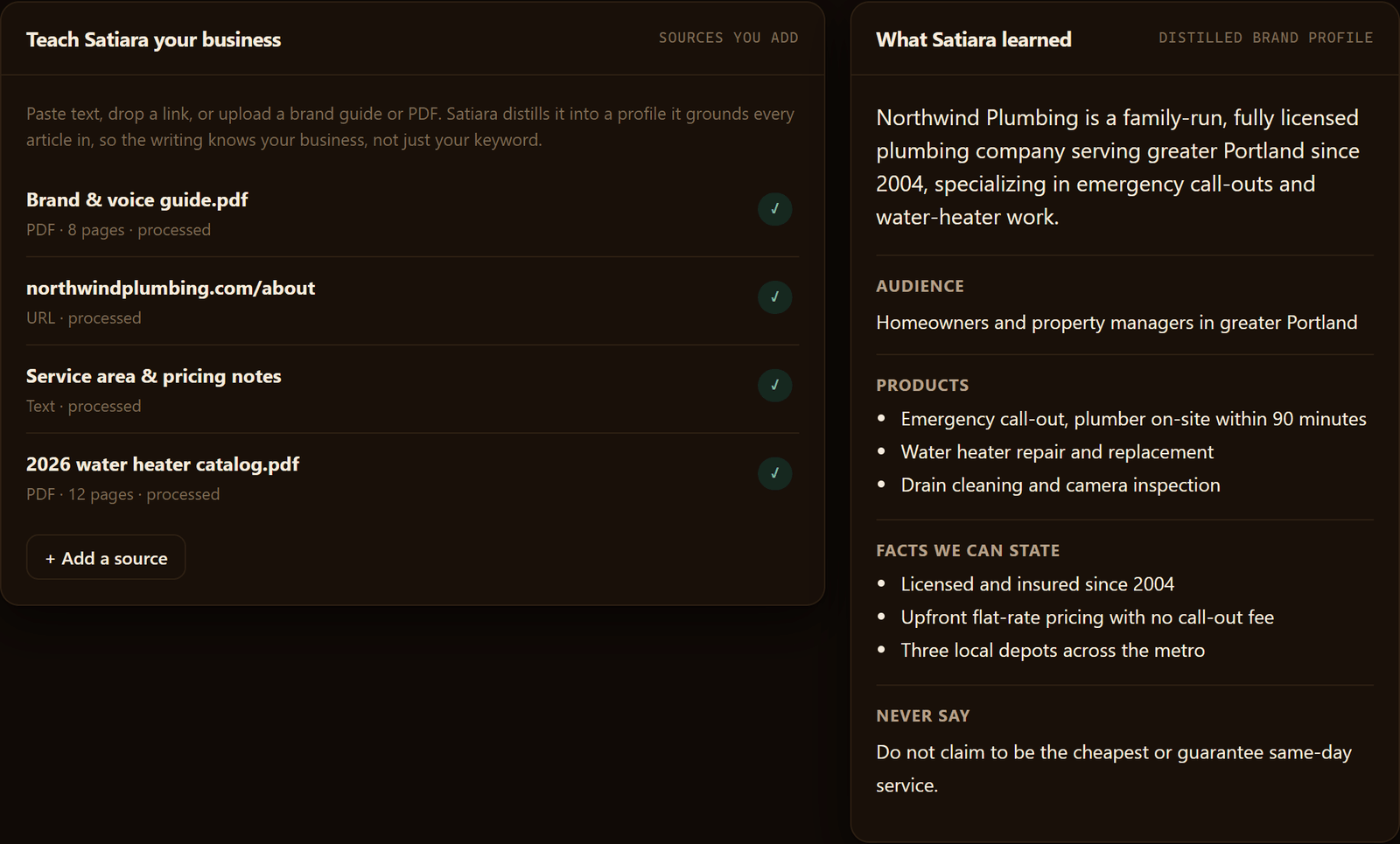
Bland output usually means the AI got nothing to work with. A blank prompt produces blank-sounding prose.
Four Inputs to Feed AI
Give it source material instead. The more real context it reads, the less it reaches for filler.
Start with four inputs that shape every piece:
- Brand voice. Paste three or four of your best existing pages so the AI learns your rhythm, not a generic one.
- Goals. Say what each article should do, like earn trust, explain a feature, or win a comparison search.
- Audience. Name the exact person reading, their role, and what they want to decide.
- Proof. Feed in your real numbers, case details, and sources so the writing has something only you could say.
Voice works best as examples, not adjectives. "Write confidently" means little. A page that already sounds like you means everything.
Write down a short voice guide too. Note the words you avoid, the length you like, and how formal you want to read.
Keeping Output Human and People-First
Google no longer treats AI content as spam by default. According to the Google Search Central Blog, the company now recognizes that AI can help create helpful, user-focused content.
The test is who the content serves, not how it was made. Content written for people first tends to clear that bar.
So aim the draft at a real reader with a real question. Then check that it answers plainly, with specifics a search result could quote.
Thin or repeated pages are the risk. A connected plan helps you avoid both.
How Topic Clusters Keep the Plan Connected
A topic cluster is a group of related pages built around one core subject. One broad page anchors it, and several focused pages support it.
Internal linking ties those pages together so readers and search engines see the relationship. That structure is why a cluster outranks scattered one-off posts.
Feed the AI your cluster, and it writes each piece knowing what the others cover. You get a plan, not a pile of articles that repeat each other.
Automating Without Handing Over Control
Giving AI your inputs is not giving up the wheel. The guardrails matter more than the automation.
Four controls keep decisions yours:
- Review mode. Nothing publishes until you approve it, so every draft passes your eyes first.
- Locked voice and goals. You set them once, and the system writes inside those limits instead of guessing.
- Protected structure. Changes to your site layout and internal links should be proposed, never silently applied.
- Reversible SEO moves. Any structural change you accept should be easy to undo if the results disappoint.
Structural decisions deserve the most caution. A bad voice choice reads awkwardly, but a bad site change can hurt how pages rank.
So keep those changes visible and reversible. Approve the ones you understand, and park the rest.
Satiara runs this way. Structural changes surface as proposals you approve, and you set review-first before anything publishes.
Done right, the trade is simple. The AI handles the volume, and you keep the judgment.
Does Automating Content Mean Losing Control?
Automation and control are not opposites. The real question is which decisions you delegate and which ones stay with you.
Publishing is a decision. Writing a draft, suggesting an internal link, flagging a stale page: those are suggestions. A sane system keeps the first firmly in your hands even when it handles the rest.
What Can Go Wrong When It Runs Unchecked
The scary mistakes are usually structural, not stylistic. A tool that rewrites your URLs, merges pages, or changes title tags in bulk can tank rankings you already earned.
Prevention comes from making every change reversible. Keep a record of what shifted so you can roll back a move that hurts.
A connected SEO tool reads your real Google Search Console data, so it can see what already ranks before it touches anything. That context is what stops a well-meaning edit from breaking a winning page.
Staying On the Right Side of Google
Google rewards content that helps a real person, not content written to fill a slot. AI output drifts into filler when nobody checks it against what the reader actually needs.
Your review is the safeguard. A human who knows the audience can catch the vague claim, the wrong example, or the fact that is simply not true.
Sourcing matters too. A B2B piece that cites real data reads as trustworthy. That is why claims here are tied to named sources rather than numbers pulled from memory.
Where You Should Still Step In
Keep your hands on the decisions that need judgment or risk. The rest can run on rails.
- Strategy: which topic clusters and keyword opportunities are worth chasing.
- Brand voice: whether a draft actually sounds like you.
- Facts and claims: anything a reader could check or quote.
- Structural changes: URL edits, merges, redirects, internal linking at scale.
- Final publish: the moment a page goes live.
When AI Is the Wrong Tool
Skip it for anything that lives or dies on firsthand knowledge. A customer story, a product launch narrative, a founder's point of view: those need you writing, with AI maybe cleaning up later.
The same goes for legal, medical, or financial claims where a confident-sounding error does real damage. Use AI to draft the scaffolding, never to be the final authority.
What the System Actually Replaces
A single writing tool replaces a blank page. A connected system replaces a stack of jobs that used to be separate.
| Doing it the old way | What the system covers |
|---|---|
| SEO strategist picking topics | Finds winnable opportunities from your Search Console data |
| Writer producing drafts | Creates new pages and refreshes old ones |
| Editor checking fit and links | Handles on-page SEO and internal linking as proposals |
| A spreadsheet tracking it all | Watches results and surfaces the next move |
The AI advances behind this shift are raising fresh questions about who owns machine-assisted work. Some researchers now propose new intellectual property frameworks, according to nih.gov.
How to Start Without Losing Your Existing Work
Begin by connecting your site in a mode where nothing publishes until you approve it. That protects what you already have.
Connect your site and let the tool read your current pages. Starting from what already ranks protects the results you have instead of overwriting them.
Pick one cluster to test. Let the system refresh a few existing pages and draft one new one, then judge the output before you scale.
Marketing teams are adopting these tools in earnest. Adobe's Future of Creativity study reports that 57% treat them as part of normal work, per Adobe_StateofCreativity_Report_2024_FV.pdf.
Satiara keeps you in charge of goals, voice, access, and publishing mode. Start small, keep the judgment, and move more onto rails only as you trust the output.
Where to Start, and What to Keep
The choice in front of you is not which chat box to open. It is how much of the chain you let AI run.
Start in review-first mode on one topic cluster. Let the tool read what you already rank for, refresh a few pages, and draft one new one before you scale anything.
Keep strategy, voice, facts, and the publish button yours. Tools like Satiara work this way by default, so you can move more onto rails only as the output earns your trust.
Frequently asked questions
How do I start creating content with AI?
Start by feeding the AI real context before asking for a single word. Give it your brand, your exact reader, your goal, and sourceable proof. Then draft, review, and cut anything generic.
Connecting your Google Search Console helps the tool pick topics you can realistically rank for. So you write winnable pages instead of guesses.
Can AI content make money?
Yes, AI content can make money when it ranks and drives action, but the draft alone rarely does it. Money comes from publishing helpful, people-first pages that target winnable keywords and link into topic clusters. Add your own proof and point of view, review every claim, and refresh pages that slip over time.
What is the best AI tool for content creation?
The best AI tool depends on your gap. Choose a single writing assistant like Jasper, Copy.ai, or ChatGPT if drafting speed is your only problem. Choose a connected SEO system if research, planning, and publishing are the bottleneck.
How much does it cost to start creating content with AI?
Costs vary by category, and a single writing assistant can be cheap while media and SEO tools cost more. Stacking several single-purpose tools adds up fast, since each one bills separately. A connected system trades a pile of subscriptions for one bill, so weigh the stack against the all-in-one before you commit.
How long before AI content shows results?
Expect weeks, not days. Pages at positions 11 to 20 can climb quickly once refreshed, since the site already ranks there. Brand-new pages on competitive terms take longer to earn trust, so start with one cluster and judge the output before you scale.
About Satiara
Satiara is an AI-driven SEO automation for a startup or SaaS founder. This article was written by the Satiara team. More about Satiara.